Demo Bot (Paper Trading) — How It Works
This bot is a client‑side demo. It never sends your seed to any server and never submits on‑chain trades. It uses live XRP/USD price data and simulates trades for testing and UI demo purposes.
Key Principles
- Runs only while your wallet is unlocked in the browser.
- Stops immediately on disconnect, refresh, or tab close.
- No XRPL transactions are sent (paper trading only).
- Trades and PnL are saved to the
demo_tradescollection.
Inputs (BOT Tab)
- Max Trade Size (XRP): Maximum XRP size per trade.
- Max Daily Trades: Upper limit of trades per day.
- Allowed Pair: Fixed to XRP/USD for demo.
- Profit Price Tolerance (%): Profit target before exit.
- Loss Price Tolerance (%): Loss threshold before exit.
Behavior (Simple Rule‑Based)
- Fetches live XRP/USD price every ~15 seconds.
- On bot enable, it immediately simulates a BUY.
- It monitors price and simulates SELL when profit or loss threshold is reached.
Example
If XRP/USD = 0.50 and you set Profit 1% / Loss 1% with 100 XRP:
- BUY simulated at 0.50 (100 XRP)
- SELL simulated at 0.505 for profit or 0.495 for loss
- PnL recorded to
demo_trades
Demo Trades Table (What It Means)
Each row is a simulated trade created by the demo bot. It helps you verify that the bot logic is running and generating trades correctly.
- Time: When the simulated trade was recorded.
- Side: BUY or SELL action.
- Price: XRP/USD price used for the simulation.
- Amount: XRP size of the simulated trade.
- PnL: Profit or loss for that trade (after a SELL).
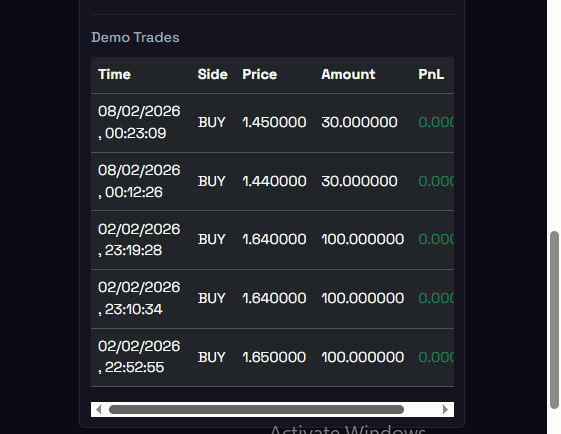
Example of the Demo Trades table generated by the paper‑trading bot.
How it works: the bot records a BUY row when it simulates entry, then later records a SELL row when
profit or loss thresholds are hit. PnL is calculated at SELL time as (sell price − entry price) × amount.
Notes
This demo bot is for UI/testing only. It does not place real XRPL orders. When you are ready for real trading, we can switch to XRPL OfferCreate with explicit user approval and full non‑custodial safeguards.